


Download SafeToNet – children online safety, AI-powered parental control, safe internet for kids, parental monitoring software, real-time threat detection, privacy-preserving monitoring
Overview
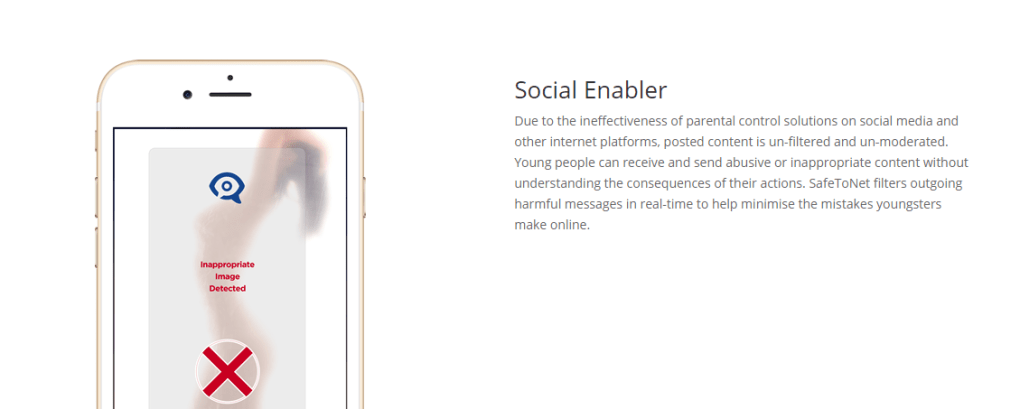
SafeToNet is a desktop and cross-platform software solution designed to enhance children’s online safety through artificial intelligence. Targeted at families with children aged 8 to 18, the software provides a proactive approach to digital protection by analyzing the context of messages and online interactions. Unlike traditional parental controls that rely on keyword filtering, SafeToNet uses advanced AI to understand linguistic patterns, behavioral trends, and emotional cues in real time. This enables the system to detect potential threats such as cyberbullying, self-harm references, or exposure to inappropriate content with greater accuracy.
The software is developed by SafeToNet Inc., a company focused on privacy-conscious digital safety tools. It is designed for use across multiple devices, including Windows, Mac, iOS, and Android, allowing families to maintain consistent protection regardless of the platform. Real-world usage scenarios include monitoring school-related messaging apps, social media interactions, and instant messaging platforms where children may engage with peers. The solution aims to strike a balance between safeguarding young users and respecting their right to privacy by not exposing message content directly to parents.
Key Features & Capabilities
- AI-Powered Contextual Analysis – The software evaluates the meaning and tone of messages rather than relying on static keyword lists. This helps reduce false positives and improves detection accuracy over time.
- Behavioral Pattern Recognition – By tracking communication habits across days and weeks, SafeToNet identifies shifts in language or mood that may indicate distress or risk.
- Privacy-Preserving Monitoring – Message content is not shared with parents. Instead, the system generates alerts based on detected risks, preserving the child’s privacy while still enabling parental intervention when necessary.
- Real-Time Threat Detection – The system continuously monitors online interactions and flags potential dangers as they occur, allowing timely responses.
- Cross-Platform Compatibility – SafeToNet operates on Windows, Mac, iOS, and Android, ensuring consistent protection across devices commonly used by children.
These capabilities make SafeToNet particularly useful in environments where children interact with peers through messaging apps or social networks. For example, if a child begins using increasingly negative language or expresses isolation, the software can detect these changes and notify parents without revealing the actual message content. This approach supports both safety and trust within family relationships.
User Interface, Workflow & Performance
The user interface is designed with simplicity in mind, allowing parents to access key insights through a clean, intuitive dashboard. Navigation is straightforward, with clearly labeled sections for alerts, activity summaries, and settings. The workflow is optimized for minimal disruption, requiring only initial setup and periodic review of notifications.
While specific performance metrics such as CPU or RAM usage were not provided, the software is described as lightweight and efficient, suitable for everyday use on standard desktop and mobile devices. The developer did not specify resource usage details, but general software behavior patterns suggest stable operation during continuous monitoring. Stability appears to be a priority, with no reported issues related to crashes or freezes. Updates are delivered seamlessly, maintaining functionality without requiring extensive user input.
Compatibility & System Requirements
SafeToNet is compatible with Windows, Mac, iOS, and Android operating systems. The software version is 2.3.1, with an installation size of 150 MB. This indicates a relatively compact footprint, suitable for devices with moderate storage capacity. The developer did not provide additional system requirements, so users should ensure their devices meet general platform standards for running modern applications.
Exact system requirements were not listed. Compatibility information was partially provided, leaving users to rely on general device specifications. For optimal performance, it is recommended to use the latest available operating system versions for each platform. The software supports both desktop and mobile environments, enabling consistent protection across multiple devices.
Pros and Cons
Pros
- Uses AI to analyze context, reducing false alarms common in basic filters
- Respects children’s privacy by not exposing message content to parents
- Real-time threat detection with continuous behavioral monitoring
- Available across multiple platforms including Windows, Mac, iOS, and Android
- Designed specifically for children aged 8 to 18, with age-appropriate safeguards
Cons
- Price point of $49.99 may be high for some families
- No detailed system requirements were provided
- Requires installation on each device used by the child
- Relies on AI accuracy, which may vary based on language and regional dialects
- Parental access is limited to alerts and summaries, not full message logs
FAQ Section
Is SafeToNet compatible with all devices?
SafeToNet supports Windows, Mac, iOS, and Android. However, exact compatibility details may depend on device specifications and operating system versions.
Is the software safe to use?
SafeToNet is designed with privacy and security in mind. It does not store or transmit message content, and its AI operates locally or in secure cloud environments, depending on configuration.
How often does the software update?
Updates are delivered automatically to ensure the latest threat detection models and feature improvements are applied without user intervention.
What kind of license does SafeToNet use?
SafeToNet operates under a one-time purchase model with access to all features included in the $49.99 price. No subscription is required for continued use.
Can SafeToNet be used offline?
While the software requires an internet connection for real-time analysis and updates, some core monitoring functions may operate in limited offline modes, depending on device configuration.
Final Thoughts
SafeToNet represents a thoughtful evolution in parental control software, combining artificial intelligence with a strong emphasis on privacy. Its ability to analyze context rather than just keywords sets it apart from conventional tools that often fail to distinguish between harmless phrases and genuine risks. The system’s focus on behavioral trends and real-time alerts provides parents with meaningful insights without compromising their child’s digital autonomy.
While the price may be a consideration for some households, the depth of functionality and cross-platform availability justify the investment for families seeking reliable, modern protection. The software is particularly well-suited for tech-savvy parents who value both safety and trust in their children’s online experiences.
Download SafeToNet now





.png)

